Skip to content

Single Ladies Dog AI Video Generator

Make a Single Ladies Dog AI video with your dog’s photo. Recast the central dancing dog, follow the loaded choreography, and keep the original sound.

Create a video

Single Ladies Dog AI19s · Original soundtrack
Dog photo
Single Ladies Dog AI reference performance

Your dog takes the center in Single Ladies Dog AI

Single Ladies Dog AI turns a pet portrait into the lead appearance for the loaded dance clip. The central dog is the replacement target; the reference provides the movement, camera and timing. You may also know this scene as Put A Ring On It Dog AI. Here, the task is simple: choose one clear dog photo and see that pet's look carried through the performance. No recording of your dog dancing is needed. The result is an AI-created interpretation, so body shape, paws and coat markings deserve a careful review.

Grey curly-haired dog dancing between two background performers

Create a Single Ladies Dog AI clip in three steps

  1. 01

    Pick your Single Ladies Dog AI portrait

    Choose one image of the dog you want to feature. Show the face, ears, coat and as much of the body as practical. Avoid a photo with several pets, a large object covering the dog, or a crop that leaves only the nose visible.

  2. 02

    Preview the dance and choose settings

    Play the reference before you begin. Single Ladies Dog AI has the performance and default prompt ready, with available resolution options in Settings. Sign in, check the credit estimate and select Generate when the chosen photo is ready.

  3. 03

    Watch your pet’s finished performance

    Open the completed Single Ladies Dog AI video in My creations. Check the dog through the moving poses, listen to the retained sound, and download the result you want. You can revisit saved videos through your account history.

Make the most of Single Ladies Dog AI

The dance behind Single Ladies Dog AI

Your dog does not need to stand upright or imitate a pose for the camera. Single Ladies Dog AI uses the existing performance for choreography and your still photo for appearance. A calm, clearly photographed pet gives the model useful visual information without asking you to stage an unusual action.

Look at the loaded dance to decide whether it fits your idea. Single Ladies Dog AI follows that routine rather than generating a custom sequence of steps. If you need a different location, story or camera treatment, begin a separate project in the AI Video Generator. A fixed routine is most useful when this particular movement is the attraction.
A recognizable Single Ladies Dog AI lead

The strongest reference is a photo that lets you recognize your dog immediately. For Single Ladies Dog AI, pay attention to the ears, muzzle, eye area and large coat patches. A sharp, evenly lit image is more informative than a dramatic backlit silhouette, even if the silhouette is your favorite photograph.

Visible markings help communicate the pet's identity, but they may shift as the generated body turns. Single Ladies Dog AI does not guarantee an exact spot-for-spot match. If a distinctive patch matters, make sure it is easy to see in the input and look for it at several moments in the result, rather than checking only the opening frame.

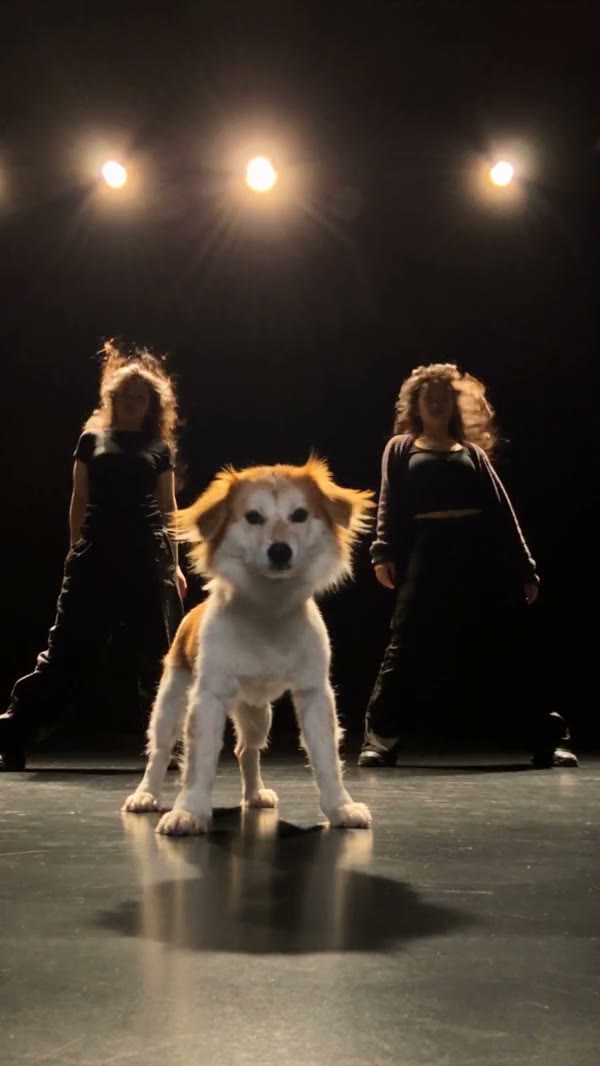
Cream-colored dog in a community Single Ladies dance adaptation

Give the whole body enough information

A close-up can show an expressive face while hiding the proportions the dance needs. Single Ladies Dog AI has to interpret the rest of the animal when the input omits it. A photo showing the torso and legs provides more context for size, build and coat distribution across the body.

You do not need to force an awkward pose or include a busy background to fill the frame. Choose a natural photograph with a clear outline. Single Ladies Dog AI still adapts that outline to the unusual movement in the source, so watch the paws and joints for stretching, extra shapes or sudden changes in scale.

One pet, one central role

The upload slot belongs to the central dog. Single Ladies Dog AI is not a way to assign every visible figure to a different pet, and a collage will not create extra roles. Keep one intended animal prominent in the image so that the replacement target is unambiguous.

If you want to compare two dogs, make separate videos using a different photo for each attempt. Single Ladies Dog AI will interpret each reference independently, and the results may vary. Keeping the resolution and framing similar makes a comparison easier to judge. For a human group performance with distinct photo assignments, explore Gas Station Dance AI instead.

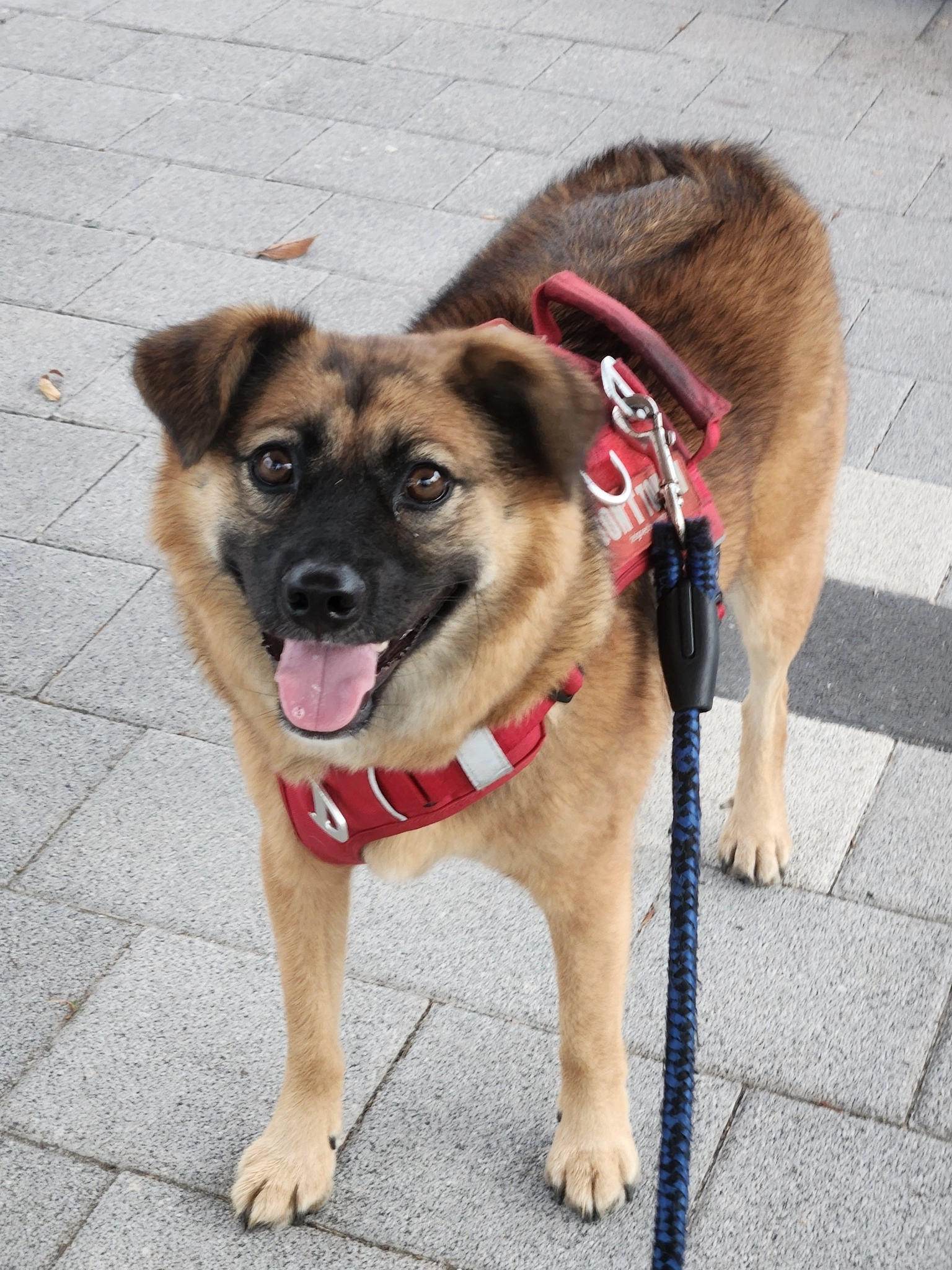
Pet portrait reference showing the dog’s face and body

Single Ladies Dog AI with original sound

The recognizable appeal comes from movement and sound working together. Single Ladies Dog AI keeps the original audio from the loaded reference alongside the edited picture. You do not need to upload a song file or request a new sound effect to hear the clip in its familiar form.

Soundtrack retention does not give you a music license. Single Ladies Dog AI also does not record your dog or create a new vocal performance from the photo. Before posting, consider the rights associated with the source and the destination platform's rules. Review the exported file with sound enabled so that timing problems do not go unnoticed.

Single Ladies Dog AI ideas for your pet

Single Ladies Dog AI works as a lighthearted pet introduction, a reaction for friends or a visual idea for a dog-focused account. Start with a photograph you own or have permission to edit, and make the generated nature of the clip clear when that context matters to the audience.

A costume visible in your image can influence the appearance, but small accessories may be simplified or distorted during the routine. Single Ladies Dog AI is better approached as a creative interpretation than a record of a real event. Your pet did not have to perform the movement, and viewers should not mistake the output for footage of an actual trained dance.

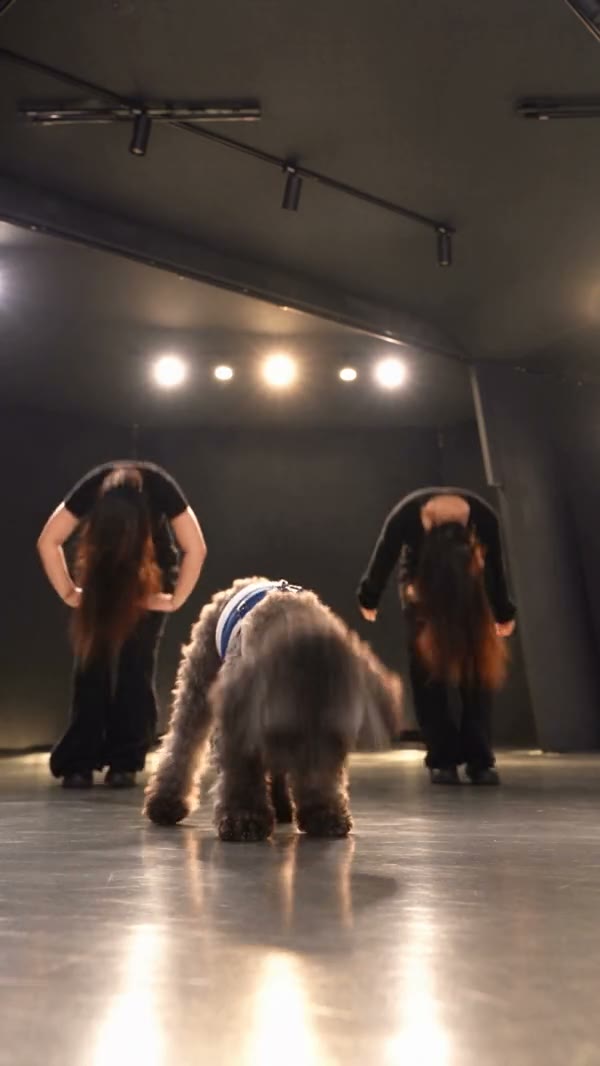
Grey dog wearing a blue harness during the group dance

Use settings for a deliberate change

Single Ladies Dog AI uses a selected video-editing model and a prepared prompt that identifies the dog to replace. The default is the simplest place to begin. Open Settings to inspect available resolution choices; if you enable a custom prompt, describe a focused change while preserving the central-pet assignment.

A higher resolution does not automatically correct anatomy or recover features missing from the input. For a better second Single Ladies Dog AI attempt, first decide what went wrong: a hidden face, unclear coat, or a body crop may call for another photo. Change one meaningful input rather than repeatedly submitting an identical request without a reason.

Know when this template fits your pet

The reference is built around a dog, so a dog photograph is the clearest match. Single Ladies Dog AI results with other animal species have not been verified. A cat, bird or highly stylized creature introduces different anatomy that may not follow the original routine convincingly.

Even within dogs, very different body proportions can affect the result. Single Ladies Dog AI should be evaluated by the actual video rather than by an assumption that every breed will behave identically. If your image needs cleanup, the AI Image Generator can help prepare an alternative reference. Review that image first so you do not accidentally remove the features that make your pet recognizable.

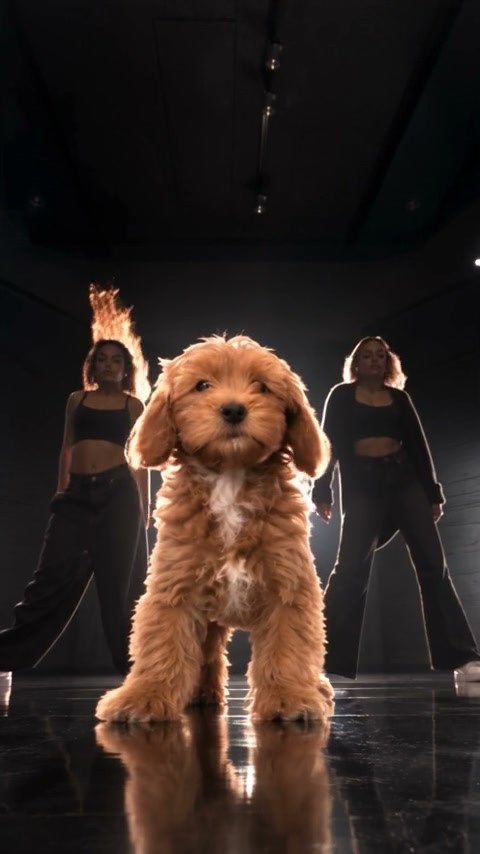
Cream-colored community dog with two background dancers

Single Ladies Dog AI: your questions answered

What is Single Ladies Dog AI?

It is a fixed-reference video tool that replaces the appearance of the central dog using one uploaded pet image. The loaded clip provides the routine, framing and original sound. It is intended for a creative dancing-pet result rather than a documentary record.

Is this the Put A Ring On It Dog AI template?

Yes. Single Ladies Dog AI uses the same dog-dance reference. Preview it in the workspace to confirm the performance before choosing your photo.

How many pictures does Single Ladies Dog AI need?

Provide one clear dog photograph. A second picture is not needed for the background, and several pets in one image can make the intended appearance unclear. Use a single animal with a visible face, coat and body whenever possible.

Can Single Ladies Dog AI work with a cat?

Other species have not been verified for this reference. The motion is based on the central dog, so a different animal can produce unpredictable anatomy and movement. Choose a dog for the closest match to the template and review the output carefully.

Must my dog be standing in the source photo?

You do not have to reproduce the dance pose. The loaded video supplies the action. A seated or standing photo can communicate the appearance, but make sure the face and body are clear enough to interpret instead of being hidden by furniture or a tight crop.

Does Single Ladies Dog AI keep the music?

The finished result includes the original sound from the reference. There is no separate music upload required in this workflow. That feature does not transfer distribution rights, so check permissions before sharing the clip publicly or using it commercially.

How long is the Single Ladies Dog AI output?

The reference runs for approximately 19 seconds in a vertical frame, and the result follows that performance. The page does not provide an independent duration selector. Watch the whole exported file to assess the opening, transitions and final movement.

Can I replace the people around the dog?

This template targets the central dog only. The surrounding scene follows the reference, and there are no separate human casting slots. If your idea needs multiple named characters, choose a trend with the appropriate photo roles rather than putting extra faces into a collage.

Does creating a Single Ladies Dog AI video use credits?

Yes, generation requires signing in and enough credits for the displayed request. You can choose a photo and inspect the reference first. Check the current estimate on Generate and consult Pricing for plan options before placing the request.

Where do I download my Single Ladies Dog AI clip?

Completed videos appear in My creations and your video history. Open the result to review it and use the download action. Inspect paws, coat markings and the face through the entire routine; do not rely only on the preview thumbnail.

Give your dog a Single Ladies Dog AI moment

Bring one clear dog photo to the prepared dance. Choose your settings, check the estimate and create a playful performance to review and keep.

Try Single Ladies Dog AI